Triathlon · Running · Cycling · Swimming

Your training. Planned, coached and adapted with AI.

TriQuest brings your training plan, AI coach, your own coach, workout builder, analysis and bike computer together in one system. For triathlon, running, cycling and swimming.

WebiPhoneApple Watch
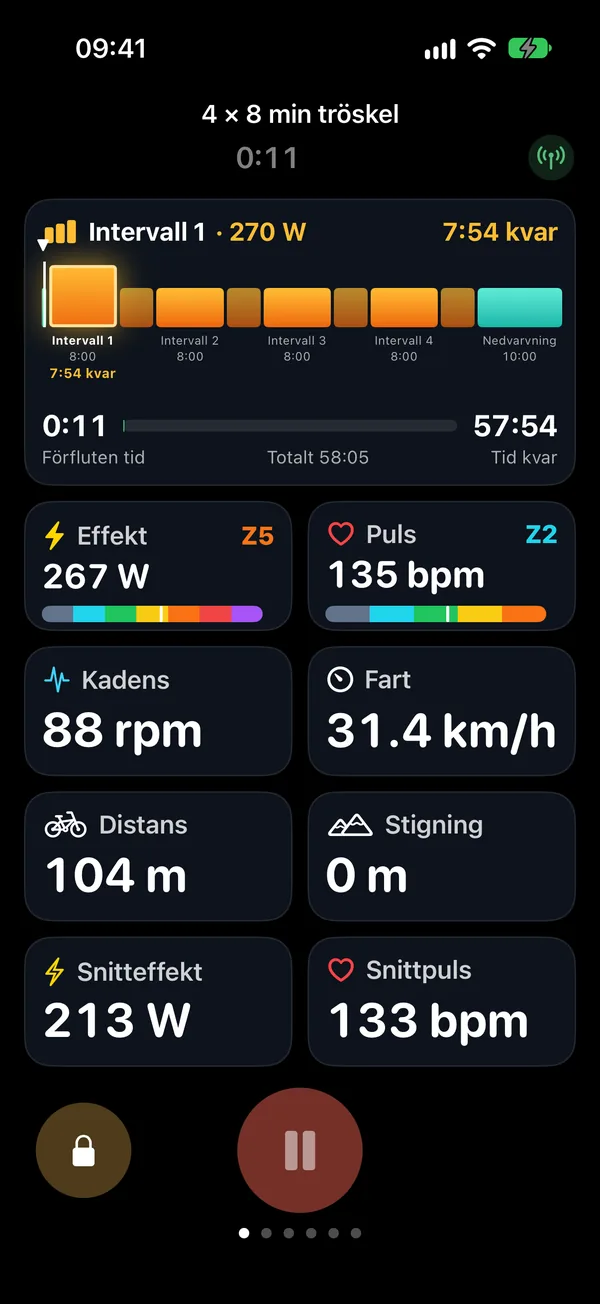
TriQuest Ride on iPhone during an interval session: the session's blocks with interval 1 at 270 watts and time left, power and heart rate with zone, cadence, speed, distance, climb and averages.
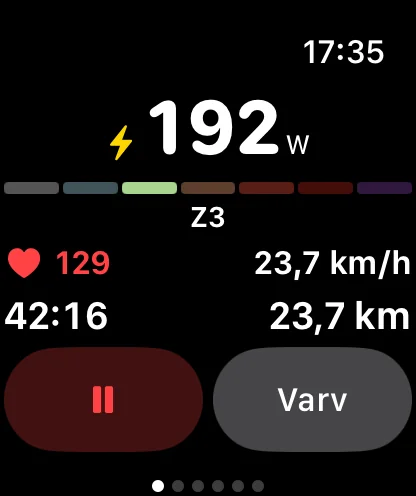
TriQuest on Apple Watch during the session: 192 watts in zone 3, heart rate 129, speed 23.7 km/h, time and distance.

How TriQuest works

One system. Five steps that fit together.

The plan, the sessions, the analysis and the coach share one picture of your training. What you do today shapes what happens tomorrow.

  1. Plan

    A personal plan for your sport and your goal, built around the days and time you have.

  2. Train

    Do the sessions with power, heart rate or pace targets: in the app, on the bike computer or with your watch.

  3. Analyse

    Every completed session is compared with the plan: time, distance, heart rate, power and load.

  4. Coach

    The coach sees the whole picture and proposes adjustments. You decide what changes.

  5. Improve

    The plan keeps up as your week, your form and your goal change, all the way to the start line.

TriQuest Coach

A coach who knows your training.

Ask the way you would ask a coach. The coach reads your plan, your completed sessions, your load and your recovery, and answers with concrete proposals. Nothing in your plan changes until you approve it.

An example conversation

  1. You write: I only have 45 minutes to train today.
  2. The coach answers: Then I suggest a shorter version of today's threshold session: 45 minutes instead of 50, keeping its purpose.
  3. Proposal from the coach

    Threshold session · 50 min changes to 45 min

    A shorter version keeps the session's purpose and fits your time.
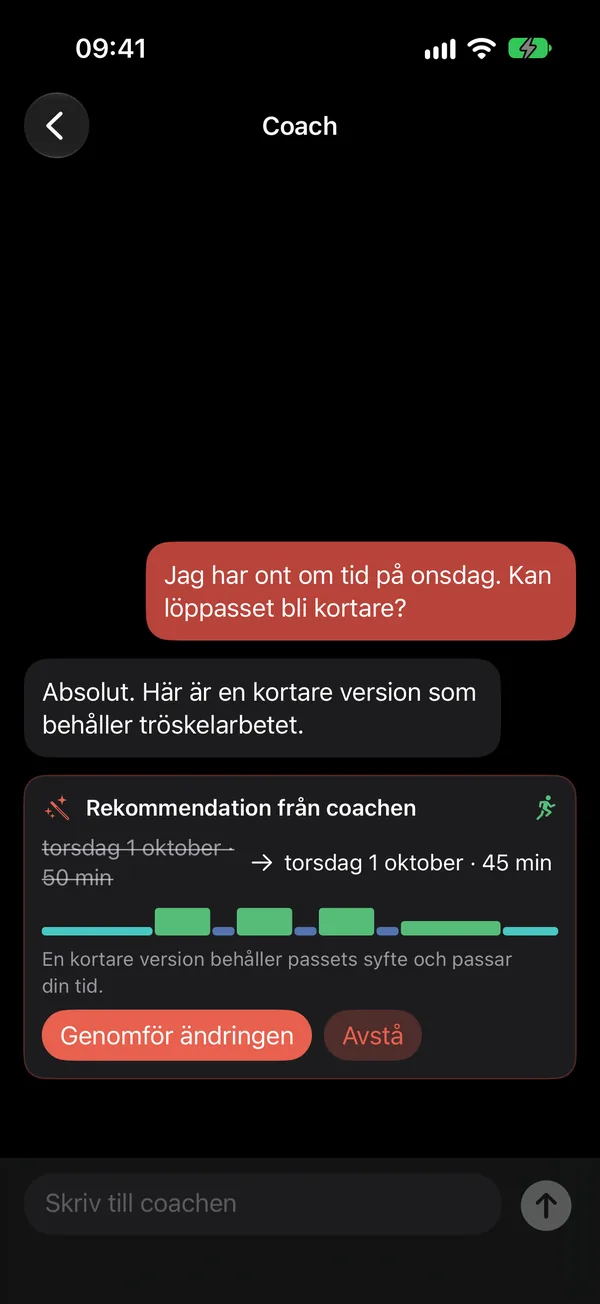
  4. You approved the proposal. Today's session is 45 minutes.
The Coach view in TriQuest on iPhone (in Swedish): a pending proposal from the coach to shorten a session from 50 to 45 minutes, with buttons to make the change or decline.
The proposal in the app, waiting for your decision.

What the coach sees

  • Your plan, your week and today's session
  • Completed sessions and training load
  • Sleep and recovery from Apple Health
  • Your races, thresholds and zones
  • The weather and your saved routes

What the coach can propose

  • Shortening, moving, swapping or removing a session
  • Adding a session that fits the week
  • Routes for a ride
  • A ride designed around a route
  • Explanations of your numbers

What the coach doesn't do

  • Change your plan without your approval
  • Make up sessions without a basis: the plan is built on TriQuest's training logic, and the coach reasons from it
  • Diagnose: it gives training advice, not medical advice

Your own coach

Train with a real coach. In the same app.

Do you have a coach, or want one? Connect with your coach in TriQuest. Your coach plans your sessions straight into your calendar, sees how they went and talks with you, in the app and on the web.

How you connect

  • Enter your coach's code in the app, or accept your coach's invitation
  • You choose what your coach can see: training, recovery and messages
  • Pause or end it whenever you like

What your coach does

  • Plans, moves and adjusts sessions in your calendar
  • Adds sessions and training blocks from their own workout library
  • Follows your completed sessions and your recovery
  • Messages you and makes video calls

Human and AI, kept apart

  • Your coach's sessions and messages carry your coach's name
  • TriQuest Coach never speaks for your coach and leaves the plan's direction to your coach
  • Coaches work in TriQuest OnPoint, a workspace of their own with all their athletes

Personal training plan

A plan for your goal. Built around your week.

Choose what you train: triathlon, running, cycling, swimming or two of them. Set your goal, a race or structured training without one, and tell us when you can train. TriQuest builds a plan in phases with structured sessions, week by week.
  • Your sport, your goal. From sprint to full distance, 5 km to marathon, a bike race or a swim race. Or twelve-week development blocks without a race.
  • Your week decides. Training days, time per day and your long-session days. Lock swimming to Tuesday and that's where it goes.
  • Sessions with substance. Steps, zones and power, heart rate or pace targets.
  • Planned versus done. Every week, per sport and for the whole plan.
  • Life happens. Move, shorten or swap a session yourself, or ask the coach.
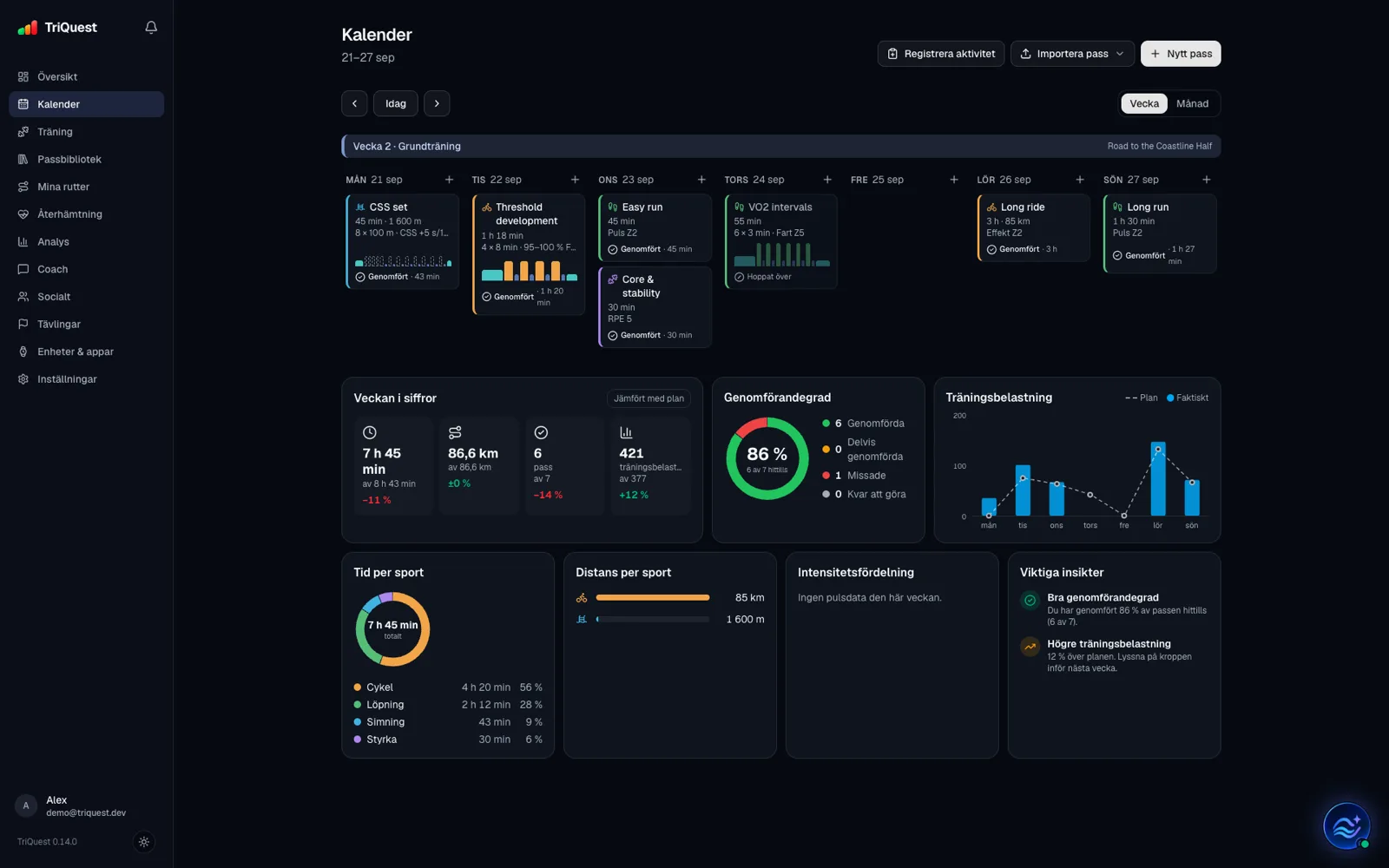
TriQuest's calendar on the web (in Swedish): a training week with swim, bike, run and strength sessions, completed and skipped sessions marked, and below it the week in numbers against the plan, completion, training load day by day, time and distance per sport and insights.
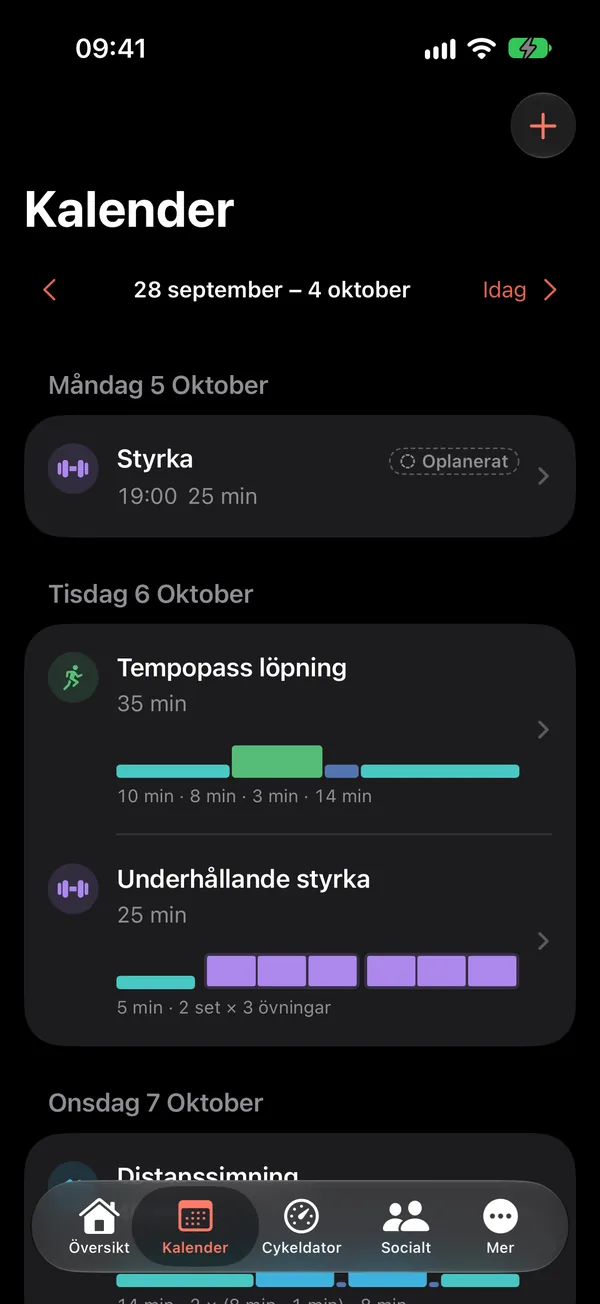
The calendar in TriQuest on iPhone with the week's sessions, their structure and times.

Workout builder and library

Build the session. Save it. Ride it.

Build structured sessions step by step and watch them take shape as you go. Save your best sessions in the library and put them in your calendar when it suits you.
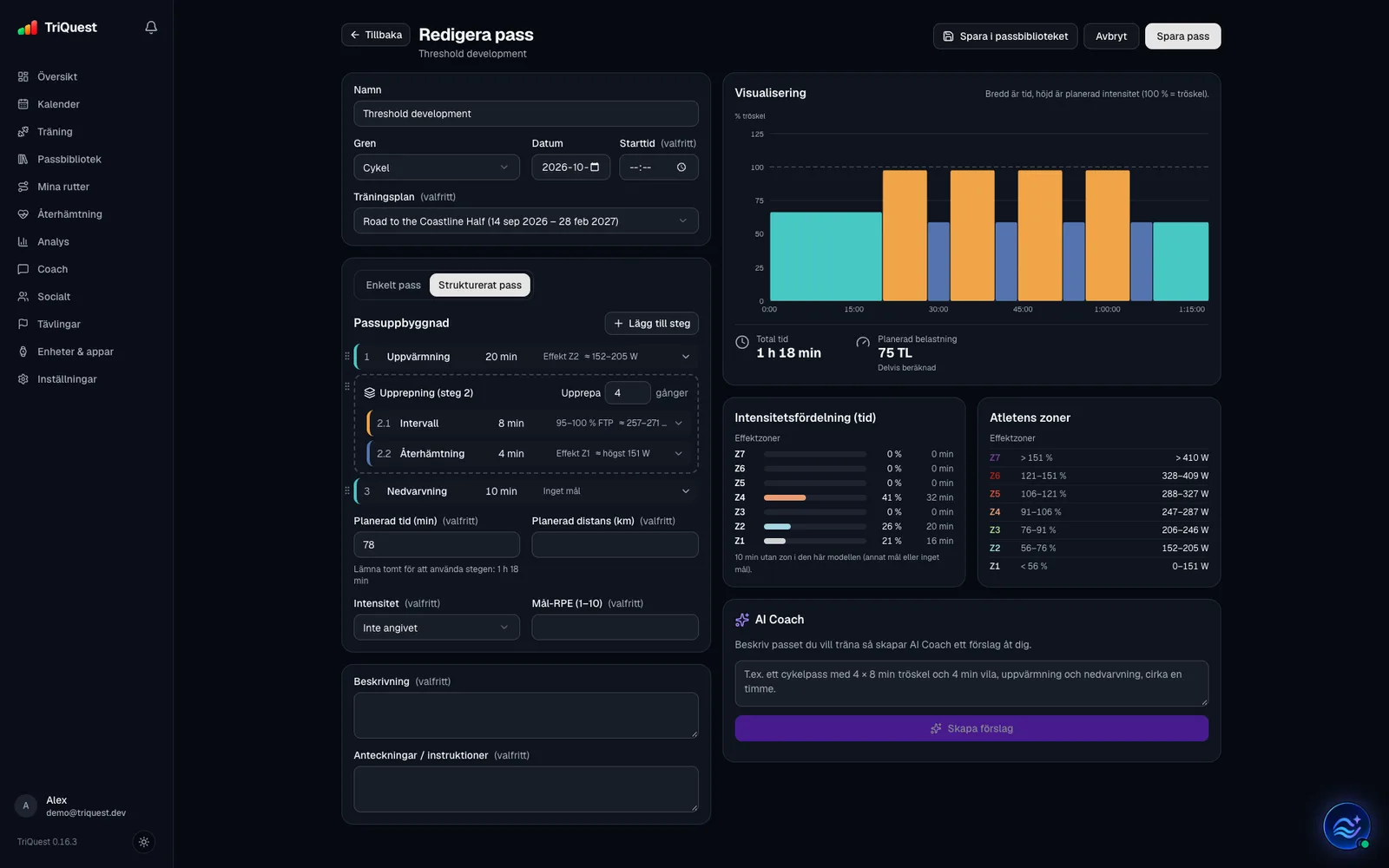
The workout builder in TriQuest on the web (in Swedish): a structured ride with a warm-up, 4 × 8 minute intervals at 95–100 % of FTP with 4 minutes of recovery and a cool-down, the session profile as bars, total time 1 h 18 min and planned load, intensity by zone, the athlete's power zones in watts and the AI Coach making suggestions.

The workout builder

  • Warm-up, intervals, repeats and cool-down
  • Targets that suit the sport: power and heart rate on the bike, pace and heart rate when running, pace when swimming
  • The session's profile, time, distance and load, shown as you build
  • Ask TriQuest Coach for suggestions while you build

The workout library

  • Your sessions sorted by sport, in your own categories and with tags
  • Search, open, edit and duplicate
  • Put a session in your calendar with one click

Then you do it

  • On the bike computer in the app, with ERG when your trainer supports it
  • On Apple Watch, step by step
  • Compared with the plan when you're done

TriQuest Ride

Your bike computer is already in your pocket.

TriQuest Ride turns your iPhone into a bike computer. Ride today's planned session with targets and a countdown for every interval, or just head out and ride.

  • The ride data screen: the session's blocks with time left, power and heart rate with zone, cadence, speed, distance, climb, average power and average heart rate.

    Ride data Session, power, heart rate, speed
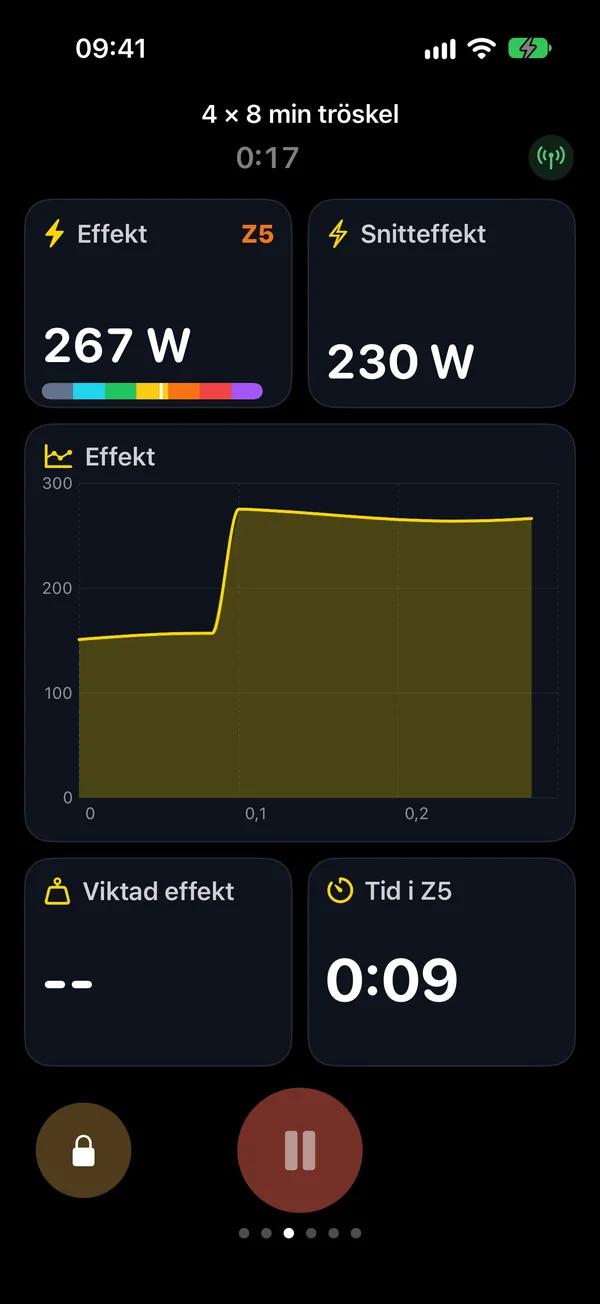
  • The power screen: power with zone and average, the power curve, weighted power and time in zone.

    Power Watts, zone, curve and average

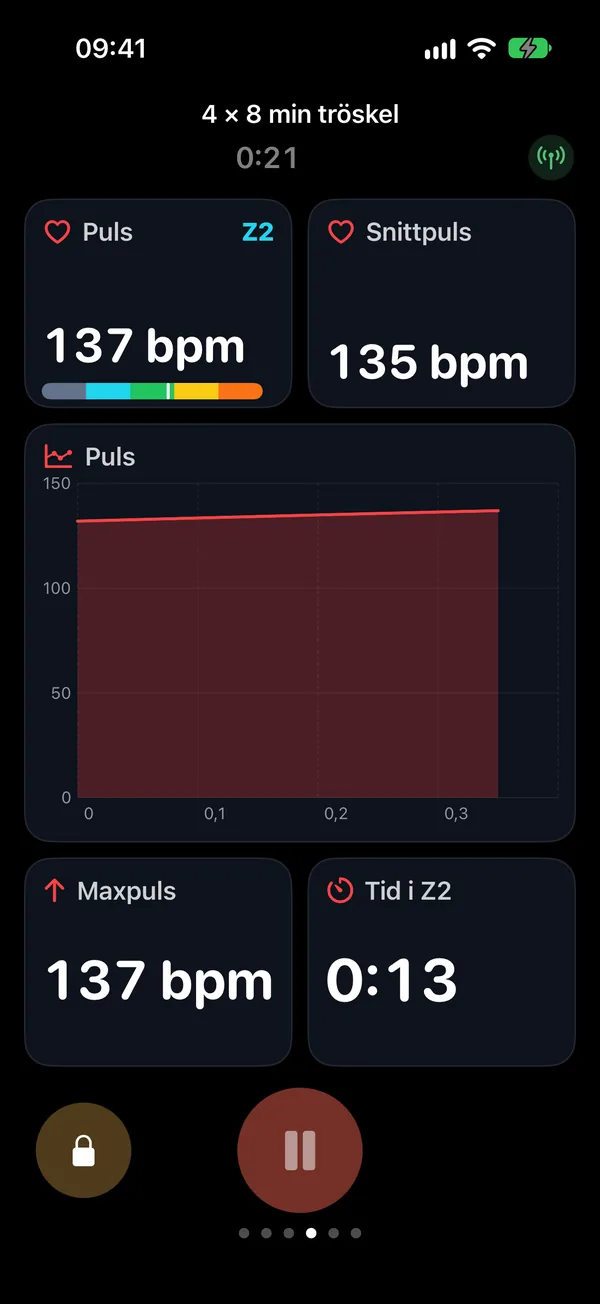
  • The heart rate screen: heart rate with zone and average, the heart rate curve, maximum and time in zone.

    Heart rate Zone, curve and max

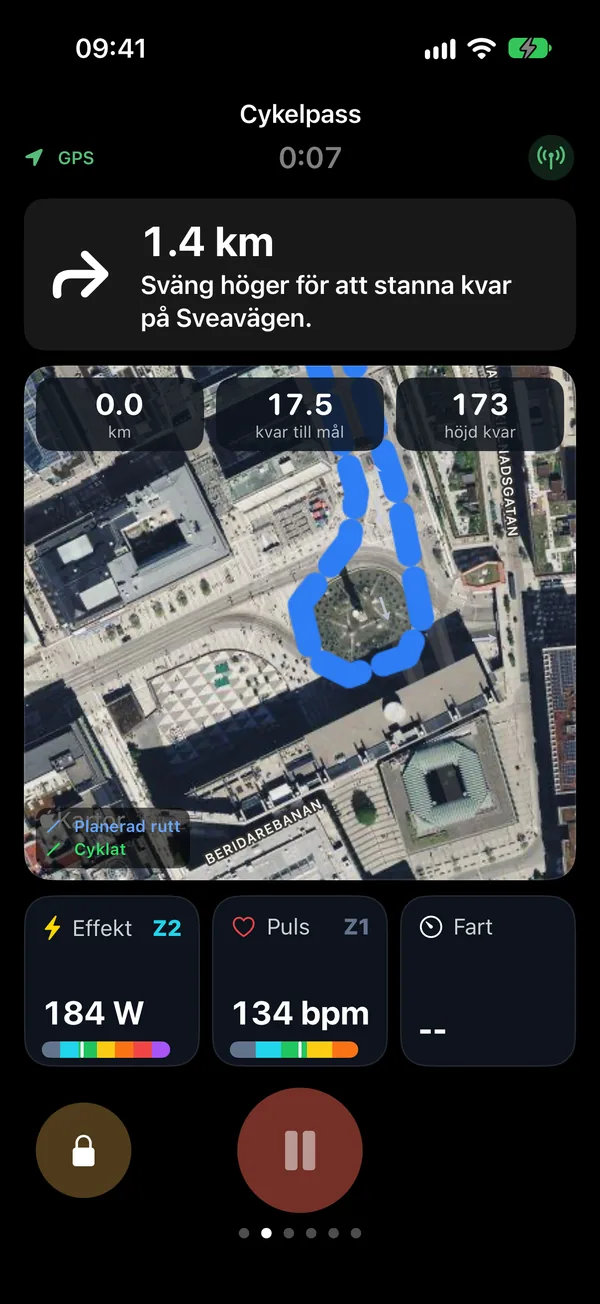
  • The navigation screen: the next turn in 1.4 km, the map around you with the route, distance and climbing left to the finish, and power, heart rate and speed.

    Navigation Next turn, distance to go

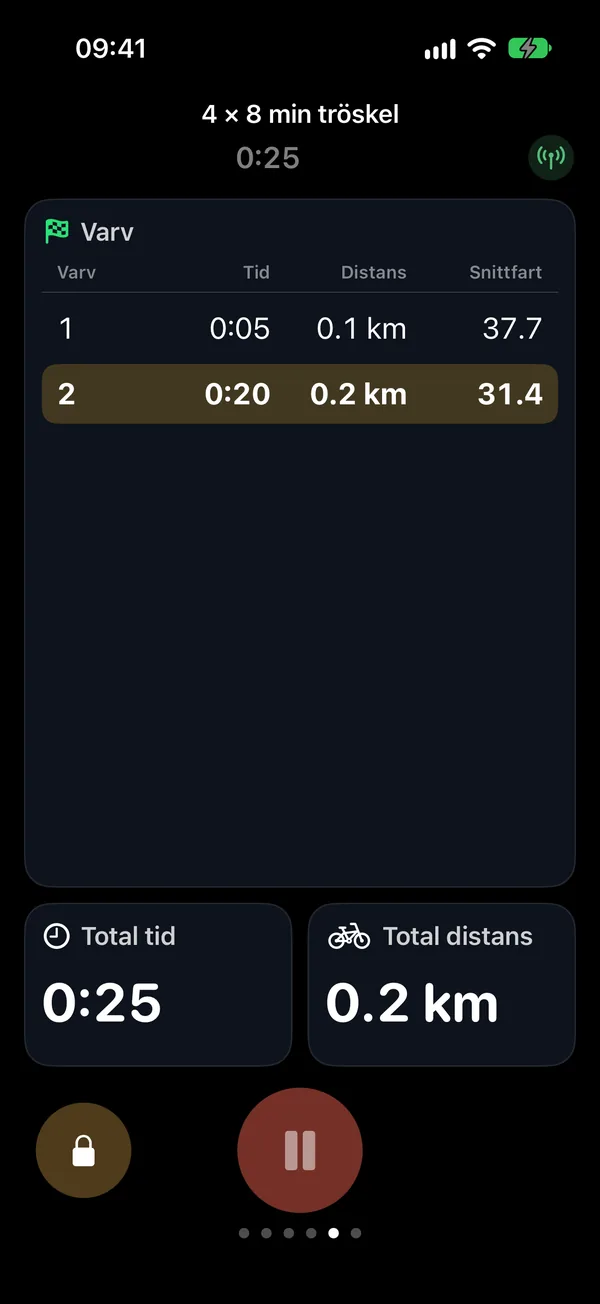
  • The laps screen: lap times, distance and average speed per lap.

    Laps Time and speed per lap

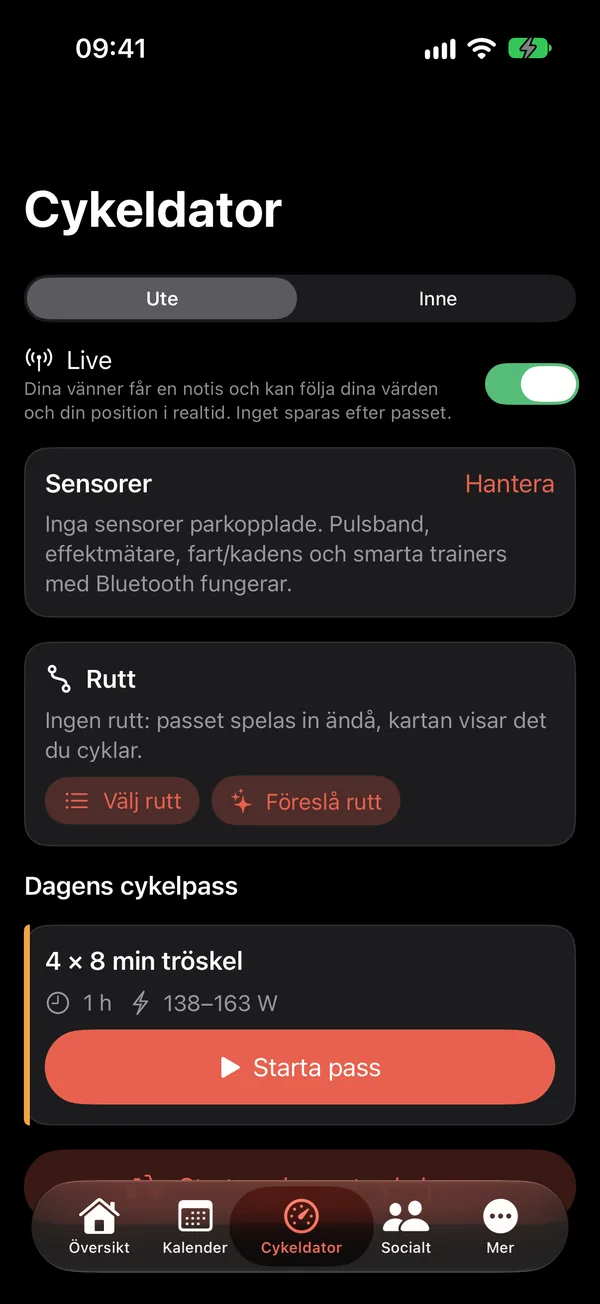
  • The bike computer's start screen: outdoors or indoors, live, sensors, route and today's ride with the start button.

    Start Today's session, outdoors or in

  • Bluetooth sensors

    Heart rate straps, power meters and speed and cadence sensors.

  • Smart trainer with ERG

    Your trainer holds the target watts through the intervals, when it supports Bluetooth control.

  • Outdoors and indoors

    GPS and map outside, the numbers in focus on the trainer.

  • The lock screen

    A Live Activity with time, power, heart rate and interval, in the Dynamic Island too.

  • Live with friends

    Turn on live and your friends can follow your ride in real time.

  • Straight into your plan

    The session is saved and compared with the plan as soon as you finish.

Routes

Draw the route. Ride it.

  1. Place your points

    The route follows roads and cycle paths between them. Drag a point to change it.

  2. Choose its character

    Balanced, flatter or hillier. Or get suggestions by distance from your starting point.

  3. See the elevation profile

    Distance, climbing and profile before you roll out.

  4. Attach and navigate

    Put the route on a ride and follow the turns on iPhone and Apple Watch.

Export and import GPX. The route is your plan: what you actually ride is saved as the session's own track, next to the planned route.
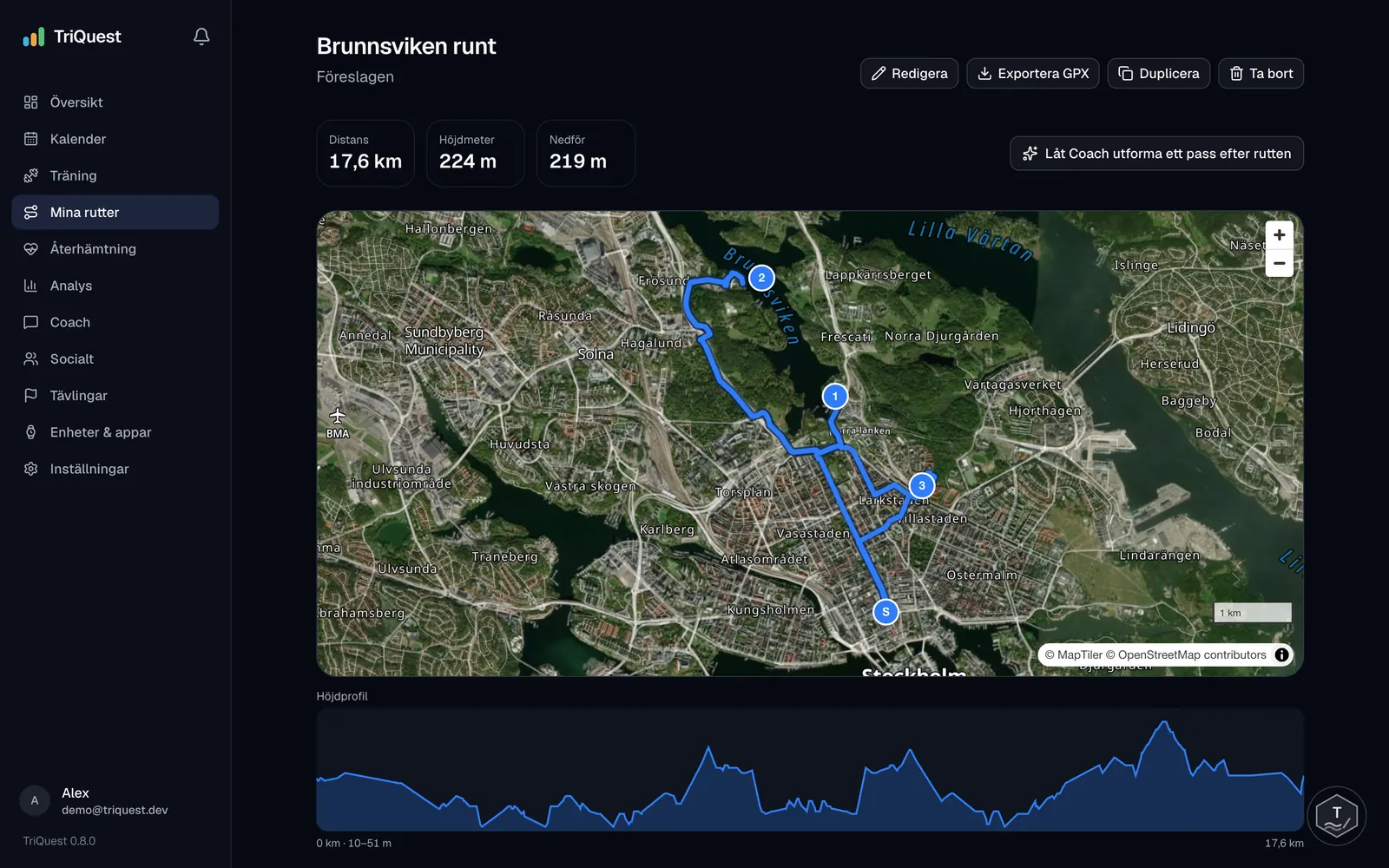
A saved route in TriQuest on the web (in Swedish): around Brunnsviken, 17.6 kilometres and 224 metres of climbing, on a satellite map with numbered points, an elevation profile and the button that lets the Coach design a session around the route.
The route planner on the web, with the button that lets the coach design a session around the route.

Apple Watch

The session on your wrist.

Ride data, intervals, navigation and heart rate on your watch. Pause, mark a lap and finish from there. The watch measures your heart rate and your iPhone records the session, so bring your phone.

  • Ride data on the watch: power, zone, heart rate, speed, time and distance.

    Ride data

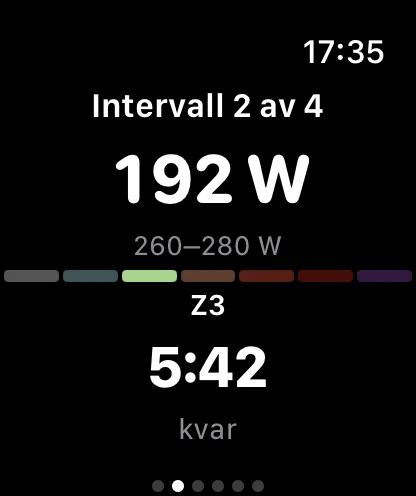
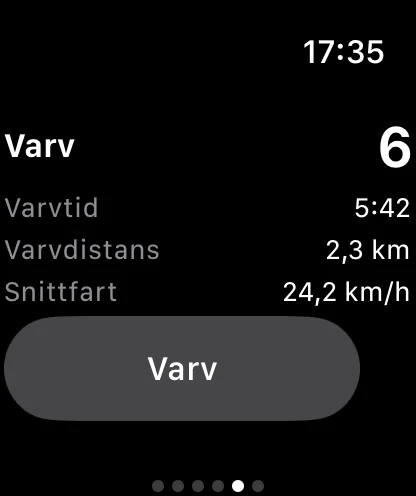
  • An interval on the watch: interval 2 of 4, 192 watts against a 260–280 watt target, 5:42 left.

    Interval

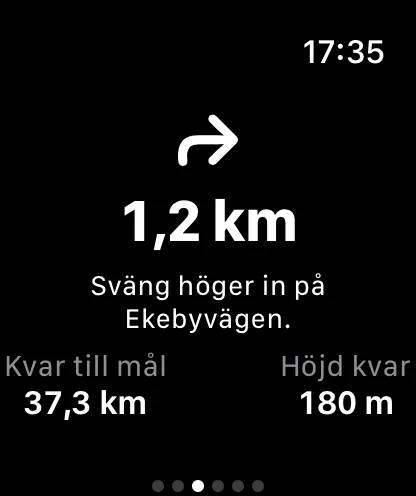
  • Navigation on the watch: turn right onto Ekebyvägen in 1.2 km, 37.3 km to the finish.

    Navigation

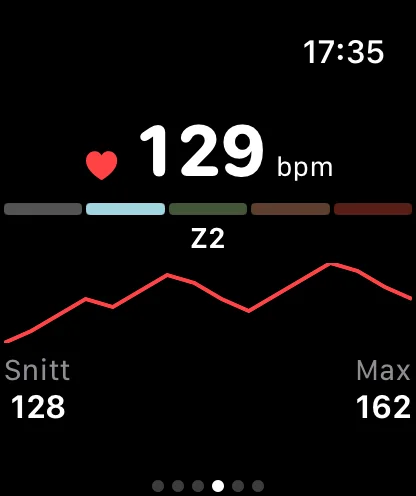
  • Heart rate on the watch: 129 beats per minute in zone 2 with the heart rate curve, average and maximum.

    Heart rate

  • Laps on the watch: lap 6 with lap time, lap distance, average speed and the lap button.

    Laps

Analysis and recovery

Understand the session. And the day.

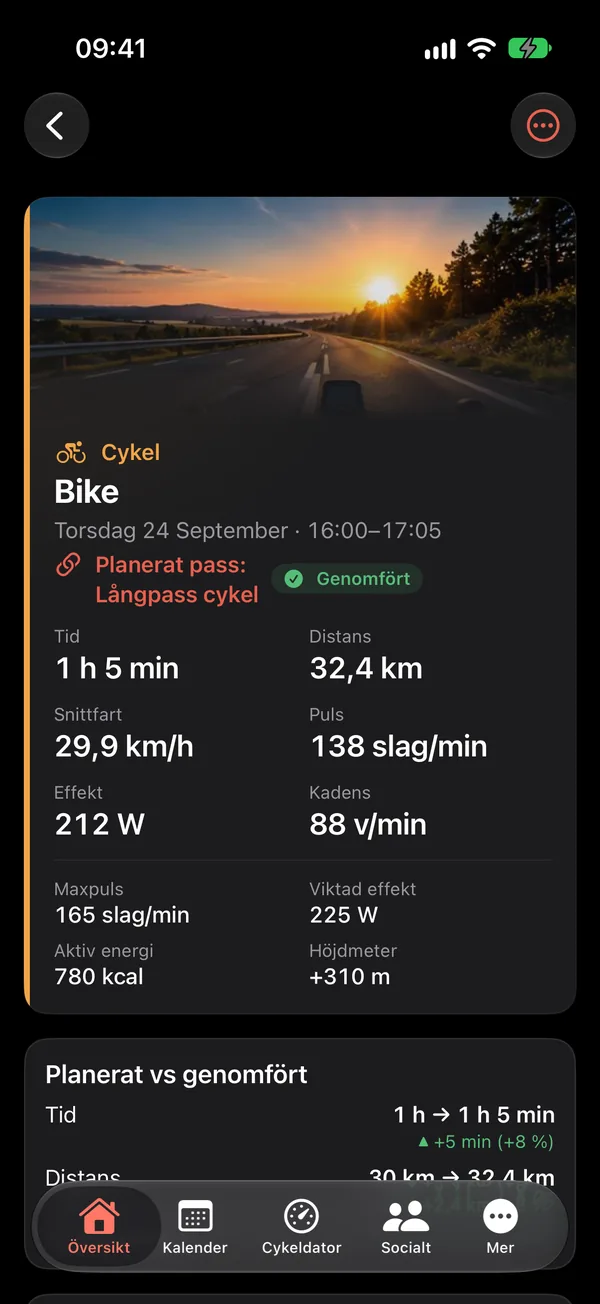
A completed ride in TriQuest: time, distance, speed, heart rate, power and cadence, and planned versus done with the difference in time and distance.

Every session against the plan

Time, distance, pace, heart rate and power, with route, elevation profile and laps. The difference from the plan shows at once, in green and red.
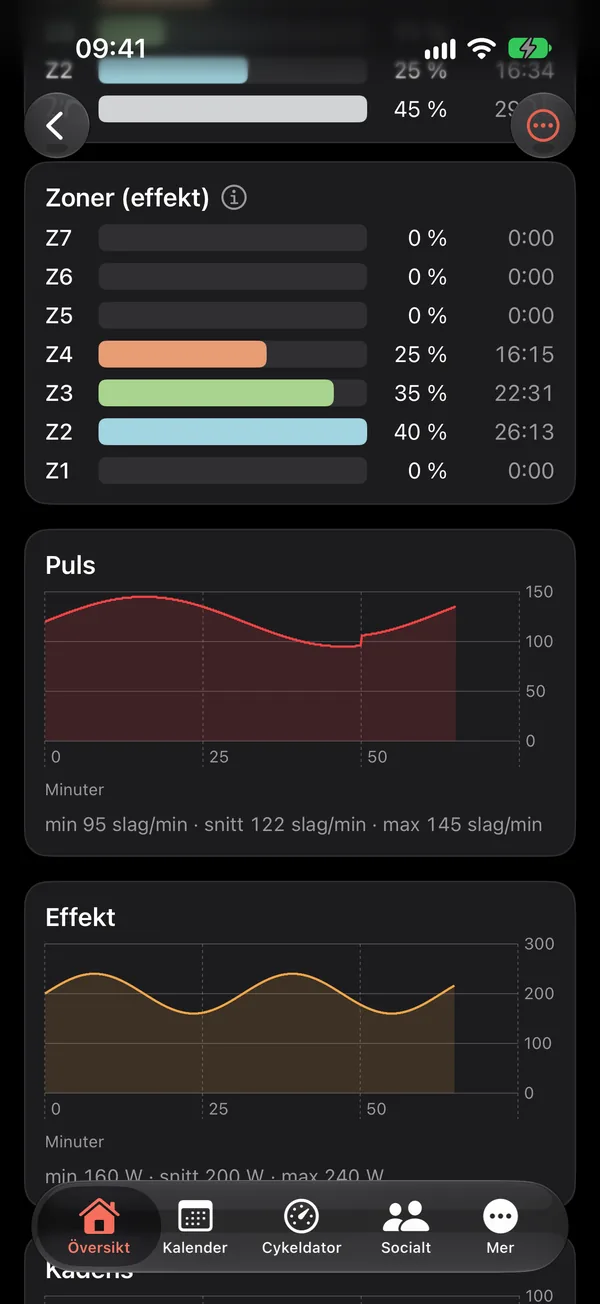
The analysis of a ride: time in zones and the heart rate and power curves over time.

What happened during the session

Power, heart rate, speed and cadence over time. Over the weeks: training load, fitness and fatigue, calculated from your own training.

Recovery next to training

Sleep, HRV, resting heart rate, respiratory rate, heart rate recovery, cardio fitness and weight from Apple Health, when your watch or scale measures them. Each value is compared with your own 28-day average. No scores and no diagnoses, just context for today's session.

  • Sleep
  • HRV
  • Resting heart rate
  • Respiratory rate
  • Heart rate recovery
  • Cardio fitness
  • Weight

Web, iPhone and Apple Watch

One plan. Everywhere you train.

TriQuest on the web: a planned route with map and elevation profile.
TriQuest Ride on iPhone with ride data during the session.
TriQuest on Apple Watch with the current interval and time left.
  1. Plan on the web

    Plan, calendar, routes and analysis on a big screen.

  2. Train with iPhone

    Today's session, the bike computer and the coach in your pocket.

  3. Follow on your watch

    The numbers and the turns on your wrist.

  4. Everything lands in one place

    The session shows at once on the web, in the app and in your plan.

Sessions from Apple Health

Sessions you record with your watch or other apps come in automatically and are matched to your plan. You can also sync with Strava.
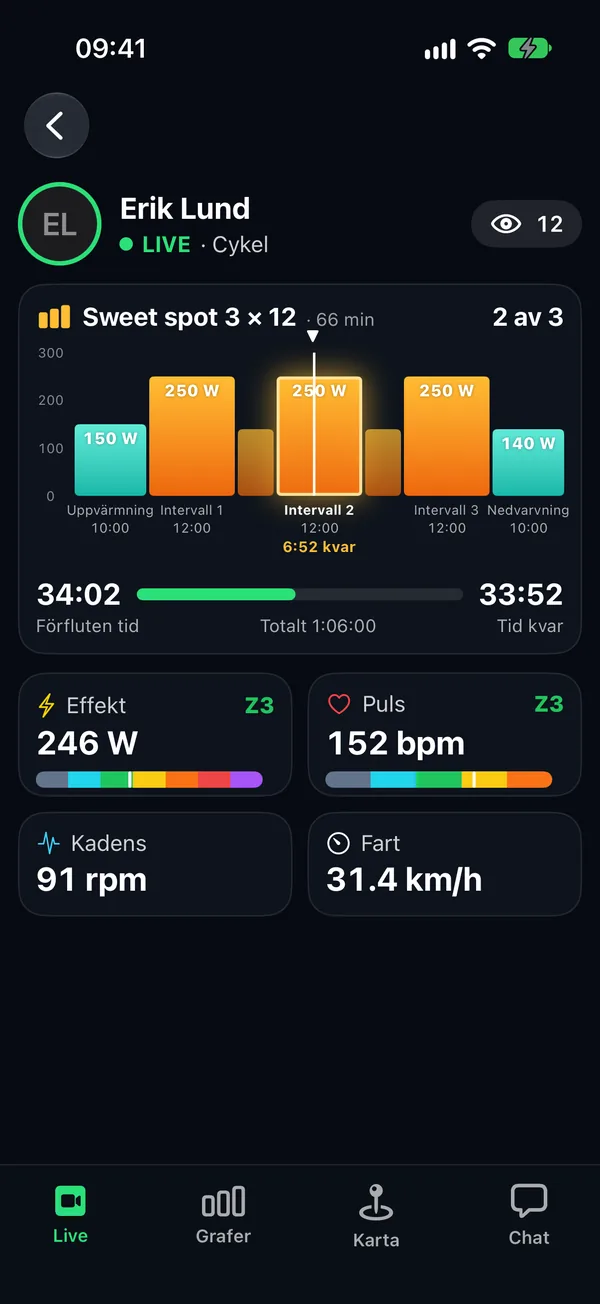
A friend's live ride in TriQuest: the session's blocks in watts and where your friend is, time left, power and heart rate with zone, cadence, speed and how many are watching.

Train with friends

Follow each other's completed sessions, give a boost and follow a friend's ride live. Only friends you have accepted see what you share.

The iPhone and Apple Watch app is in testing and not yet on the App Store. The web works in every modern browser. TriQuest is in English and Swedish and follows your browser's or phone's language.

Who it's for

Born in triathlon. Made for every sport.

Plans for triathlon, running, cycling and swimming, one sport or two. Choose all three and it's triathlon. The bike computer, routes, analysis and coaches come along whatever your sport.

  • Triathlon

    Plans from sprint to full distance, with brick sessions and a taper.

  • Cycling

    Plans for bike races, a bike computer, routes and power intervals.

  • Running

    Plans from 5 km to marathon, with pace and heart rate zones.

  • Swimming

    Plans for swim races, with distances and pace from your CSS.

  • Strength

    Add strength to any sport, fitted into your week.

Ready to train smarter?

Let TriQuest bring your plan, sessions, analysis and coaching together in one place.